Suppress user creation and license assignment for Microsoft subscriptions during checkout
Moderate Upgrade
Important: This feature is currently in Early Availability (EA) status.
Marketplace Managers can enable user assignment suppression on the Microsoft connector. When enabled, checkout no longer requires a Microsoft username, and the connector does not create subscription-creator users or auto-assign licenses during Microsoft subscription purchases and order updates. Partners who manage users and licenses in Microsoft 365 Admin Center can complete assisted sales without dummy users or unwanted license assignments.
Previously, every Microsoft subscription purchase required a username at checkout. The connector created that user on the tenant and auto-assigned the first license. Partners who assign licenses manually in Microsoft 365 Admin Center had to enter placeholder usernames and clean up unwanted users and assignments after each order.
With this release, suppression is available as an opt-in marketplace setting for new orders and order updates on both existing linked tenants and new tenant purchases.
Note: When creating a new Microsoft tenant, Microsoft Partner Center still requires an admin user. Suppression skips the checkout username step, does not create subscription-creator users beyond what Microsoft mandates, and does not auto-assign a license to the subscription creator. Assign licenses manually in Microsoft 365 Admin Center after the order completes. Existing subscriptions are not modified. Non-Microsoft products are unaffected.
UI updates
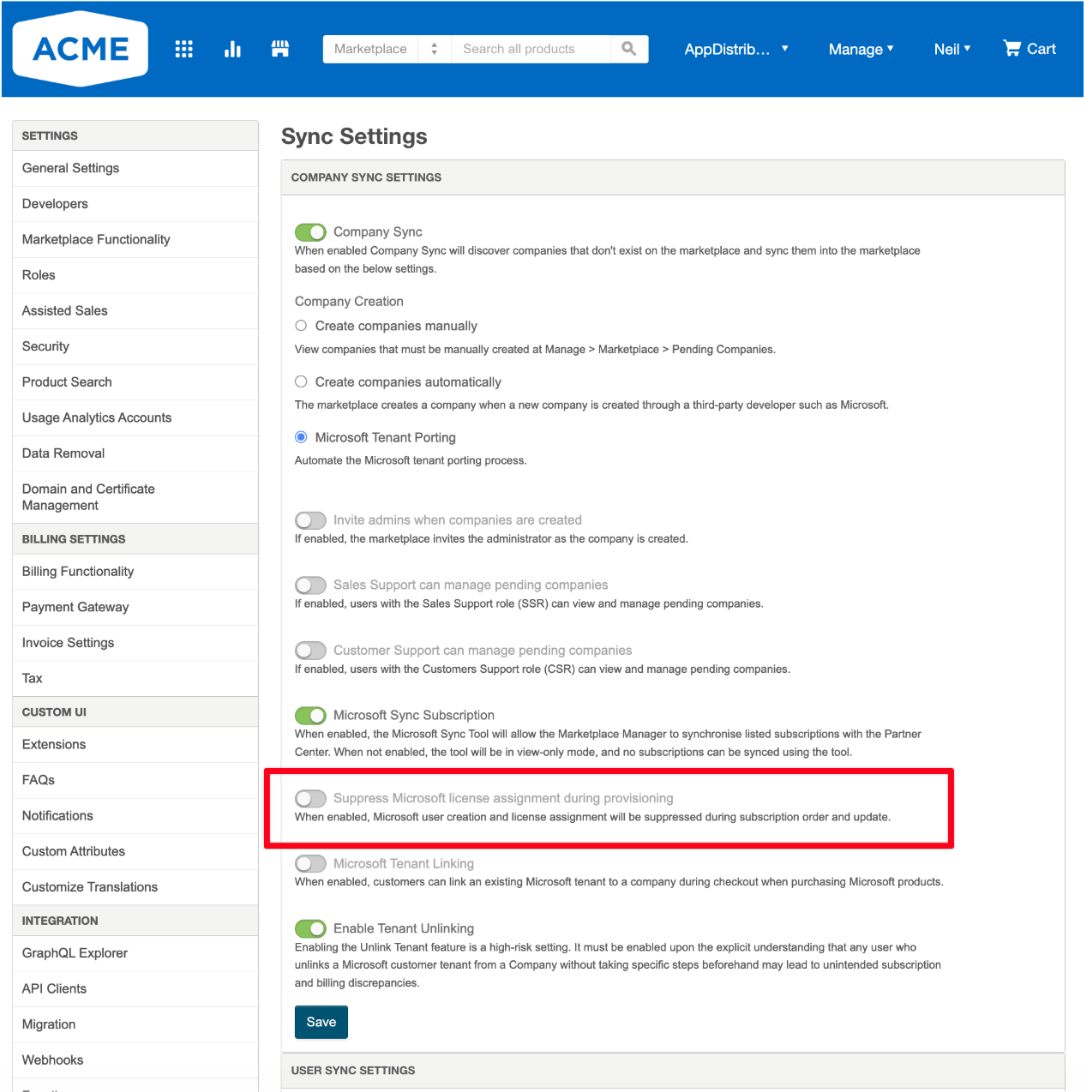
A new checkbox is available under Manage > Marketplace > Settings (Microsoft section): Suppress user creation & license assignment.
Checkout: The Microsoft username field is hidden from Additional Information when suppression is enabled.
Checkout v1: The username modal is skipped when suppression is enabled.
To enable suppression,
- Go to Manage > Marketplace > Settings > Data Sync > Sync Settings and navigate to the Company Sync section.
- Select Suppress user creation & license assignment.
- Save your changes.
Feature enablement
This feature is not enabled by default. Contact your AppDirect technical representative to request it.
Setting enablement
Suppression should be enabled in Marketplace Settings. See above for more information.
Documentation
Refer to Synchronize data.
Was this page helpful?
Tell us more…
Help us improve our content. Responses are anonymous.
Thanks
We appreciate your feedback!